简介:SpringBoot和Spring的区别是什么?SpringBoot的优势在哪里?虽然SpringBoot已经成为开发过程不可缺少的部分,但这样的问题却会让很多程序员抓耳挠腮,今天让我们一块探讨。
SpringBoot
特性
以下提出来的特性都是针对Spring而言的优点。
更快速的构建能力
SpringBoot提供了更多的Starters用于快速构建业务框架,它包含了一系列可以集成到应用里面的依赖包,只需要一个依赖项就可以来启动和运行Web应用程序,以简化构建和复杂的应用程序配置。
<dependency>
    <groupId>org.springframework.boot</groupId>
    <artifactId>spring-boot-starter-web</artifactId>
</dependency>
常见的Starter有:
- spring-boot-starter-test
- spring-boot-starter-web
- spring-boot-starter-data-jpa
起步依赖
在创建 Spring Boot 时可以直接勾选依赖模块,这样在项目初始化时就会把相关依赖直接添加到项目中,大大缩短了查询并添加依赖的时间。
内嵌容器支持
Spring Boot 内嵌了Tomcat、Jetty、Undertow三种容器,其默认嵌入的容器是 Tomcat。
<dependency>
    <groupId>org.springframework.boot</groupId>
    <artifactId>spring-boot-starter-web</artifactId>
    <!-- 移处 Tomcat -->
    <exclusions>
        <exclusion>
            <groupId>org.springframework.boot</groupId>
            <artifactId>spring-boot-starter-tomcat</artifactId>
        </exclusion>
    </exclusions>
</dependency>
<!-- 更换为jetty 容器 -->
<dependency>
    <groupId>org.springframework.boot</groupId>
    <artifactId>spring-boot-starter-jetty</artifactId>
</dependency>
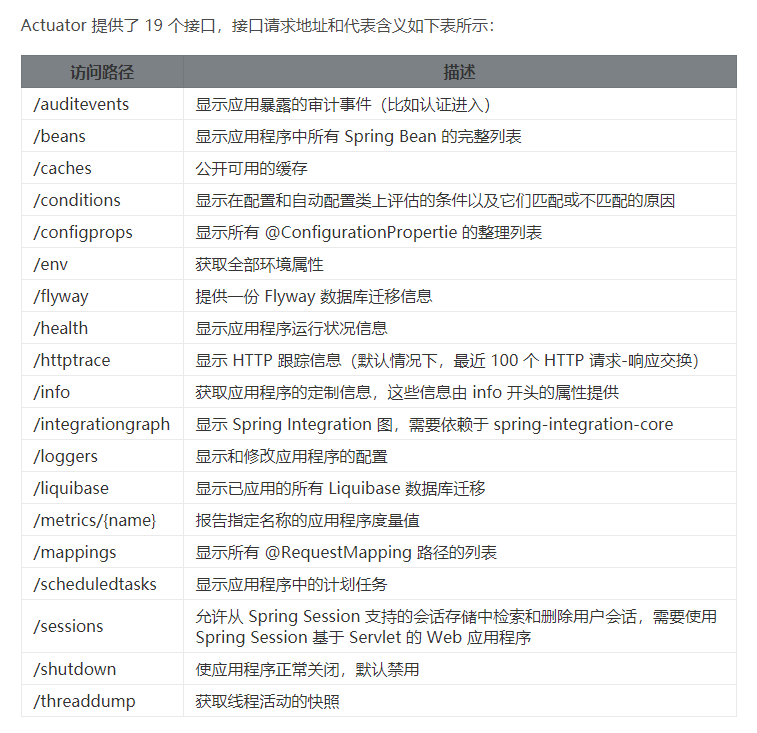
Actuator监控
主要用于提供对应用程序监控,以及控制的能力,比如监控应用程序的运行状况,或者内存、线程池、Http请求统计等,同时还提供了关闭应用程序等功能。
启动流程
Spring Boot可以直接main函数启动,嵌入式web服务器,避免了应用程序部署的复杂性。程序的入口是使用@SpringBootApplication注释的类中的SpringApplication.run(Application.class, args) 方法。
@SpringBootApplication
public class Application {
    public static void main(String[] args) {
        SpringApplication.run(Application.class, args);
    }
}
public ConfigurableApplicationContext run(String... args) {
    // 1.创建并启动计时监控类,监控并记录Spring Boot应用启动的时间以及当前任务的名称
    StopWatch stopWatch = new StopWatch();
    stopWatch.start();
    // 2.声明应用上下文对象和异常报告集合
    ConfigurableApplicationContext context = null;
    Collection<SpringBootExceptionReporter> exceptionReporters = new ArrayList();
    // 3.设置系统属性headless的值为true则表示运行headless服务器
    this.configureHeadlessProperty();
    // 4.创建所有 Spring 运行监听器并发布应用启动事件(即获取监听器名称并实例化这些类)
    SpringApplicationRunListeners listeners = this.getRunListeners(args);
    listeners.starting();
    Collection exceptionReporters;
    try {
        // 5.创建一个应用参数对象
        ApplicationArguments applicationArguments = new DefaultApplicationArguments(args);
        // 6.准备环境
        ConfigurableEnvironment environment = this.prepareEnvironment(listeners, applicationArguments);
        this.configureIgnoreBeanInfo(environment);
        // 7.创建 Banner 的打印类
        Banner printedBanner = this.printBanner(environment);
        // 8.根据应用类型创建应用上下文对象
        context = this.createApplicationContext();
        // 9.实例化异常报告器
        exceptionReporters = this.getSpringFactoriesInstances(SpringBootExceptionReporter.class, new Class[]{ConfigurableApplicationContext.class}, context);
        // 10.将创建好的上下文对象传递下去
        this.prepareContext(context, environment, listeners, applicationArguments, printedBanner);
        // 11.刷新应用上下文,以解析配置文件,加载bean对象
        this.refreshContext(context);
        // 12.应用上下文刷新之后的事件的处理
        this.afterRefresh(context, applicationArguments);
        // 13.停止计时监控类
        stopWatch.stop();
        // 14.输出日志记录执行主类名、时间信息
        if (this.logStartupInfo) {
            (new StartupInfoLogger(this.mainApplicationClass)).logStarted(this.getApplicationLog(), stopWatch);
        }
        // 15.发布应用上下文启动完成事件
        listeners.started(context);
        // 16.执行所有 Runner 运行器
        this.callRunners(context, applicationArguments);
    } catch (Throwable var10) {
        this.handleRunFailure(context, var10, exceptionReporters, listeners);
        throw new IllegalStateException(var10);
    }
    try {
        // 17.发布应用上下文就绪事件
        listeners.running(context);
        // 18.返回应用上下文对象
        return context;
    } catch (Throwable var9) {
        this.handleRunFailure(context, var9, exceptionReporters, (SpringApplicationRunListeners)null);
        throw new IllegalStateException(var9);
    }
}